Create and update customers with your AI assistant
You can now allow an AI assistant connected to Alunta through MCP to make simple customer changes. This makes it easier to create a customer or keep selected customer details up to date directly from your conversation with the assistant.
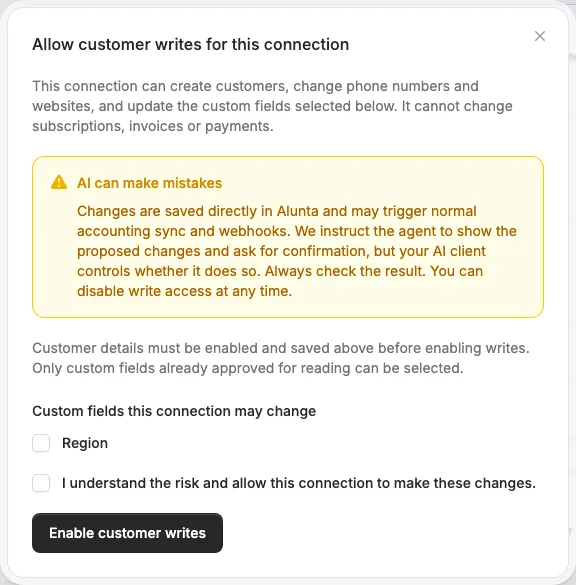
You can now allow an AI assistant connected to Alunta through MCP to make simple customer changes. This makes it easier to create a customer or keep selected customer details up to date directly from your conversation with the assistant.
With write access enabled, the assistant can:
- Create new customers.
- Update the phone number and website of existing customers.
- Fill in or update the custom customer fields you have specifically approved.
For example, try: “Update Nordlys Studio’s website to https://nordlys.example.com.”
Choose which connections can make changes
All connections remain read-only by default. An owner or administrator can go to Settings → AI Access, find the connection and choose Manage → Configure writes. Customer details must be enabled and saved first. You also select which custom fields the connection may change and acknowledge the risk.
Write access covers these customer details. It does not allow deleting customers, changing subscriptions or invoices, taking payments or issuing refunds. Individual bookkeeping access remains read-only.
Review the changes
AI can make mistakes. We instruct the assistant to show the selected account, customer and proposed values and ask for your confirmation before making a change. However, your AI client decides whether to follow that instruction; Alunta does not require a separate confirmation for each call.
Changes are saved directly and may trigger your usual accounting sync and webhooks. Always check the result. You can turn off write access for the connection at any time while keeping its read access.


The people and AI helpers behind the updates
Bo Møller and Emil Højbjerg are the primary developers behind Alunta. They spend most of their time coding, so they have delegated the wording of these explanations to our AI helpers.
The AI helpers write from the updates we have deployed to the product. Bo and Emil are behind the changes and remain responsible for ensuring the information reflects what was actually released.
