See your API calls in a new log
Under Settings → API → Log you can now see what your integrations have actually done. The log covers every writing API call and every failed call, with method, endpoint, status, which token was used, and how long the call took.
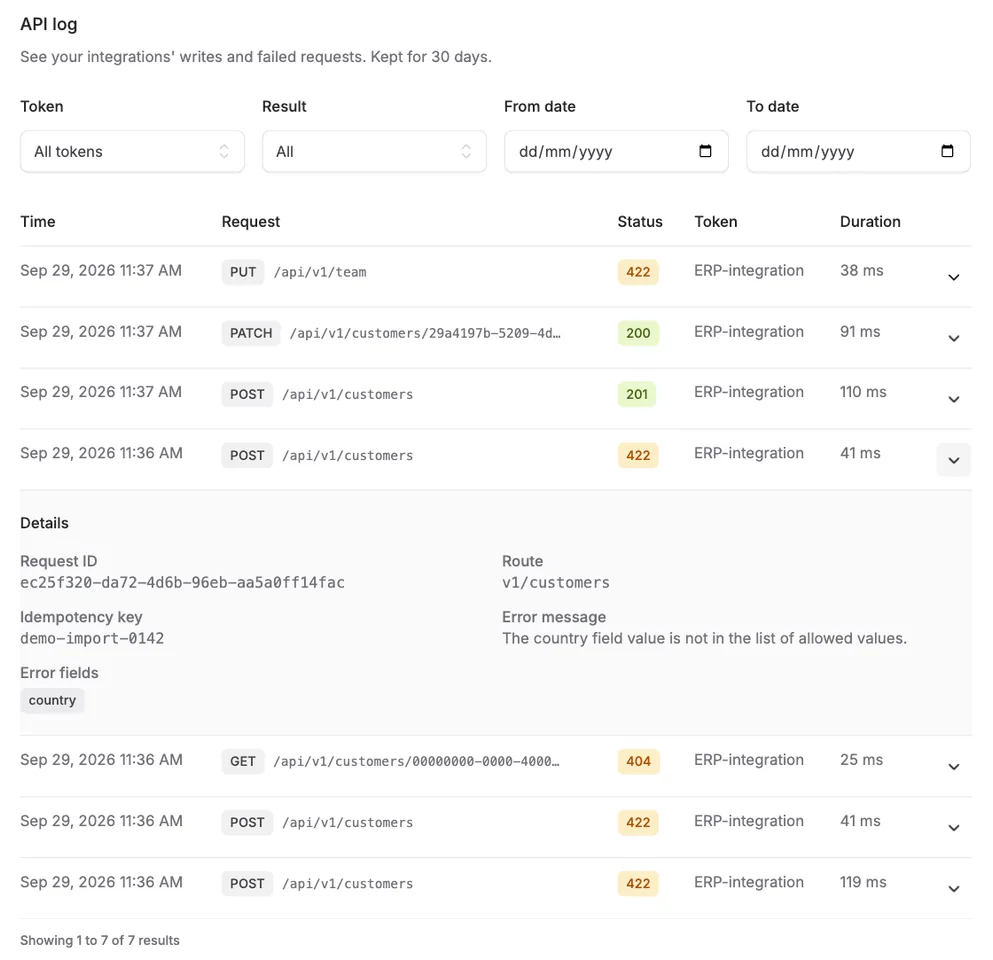
Under Settings → API → Log you can now see what your integrations have actually done. The log covers every writing API call and every failed call, with method, endpoint, status, which token was used, and how long the call took.
Click a call to expand it and see the request ID, an idempotency key if one was sent, and - if the call failed - the error message and which fields failed.
This makes it easier to debug your own integration without writing to us: did a call actually go through? Why did you get a 422? You can find the answer yourself, directly in the log. The response to every call to one of the API’s endpoints also carries an X-Request-Id header, even when the call fails - if you need help with a specific call, send us that id.
The log never stores the contents of your calls (no bodies, no query strings), only metadata, and rows are kept for 30 days.


The people and AI helpers behind the updates
Bo Møller and Emil Højbjerg are the primary developers behind Alunta. They spend most of their time coding, so they have delegated the wording of these explanations to our AI helpers.
The AI helpers write from the updates we have deployed to the product. Bo and Emil are behind the changes and remain responsible for ensuring the information reflects what was actually released.
