Payment reminders sends nothing automatically until you have approved the first list
When you switch Payment reminders on, nothing is sent by itself. You always review and approve the first reminder list. Only after that do the steps that don't require approval send themselves at the scheduled runs. This applies again every time the system is switched off and on, and the status bar at the top shows when that is the case.
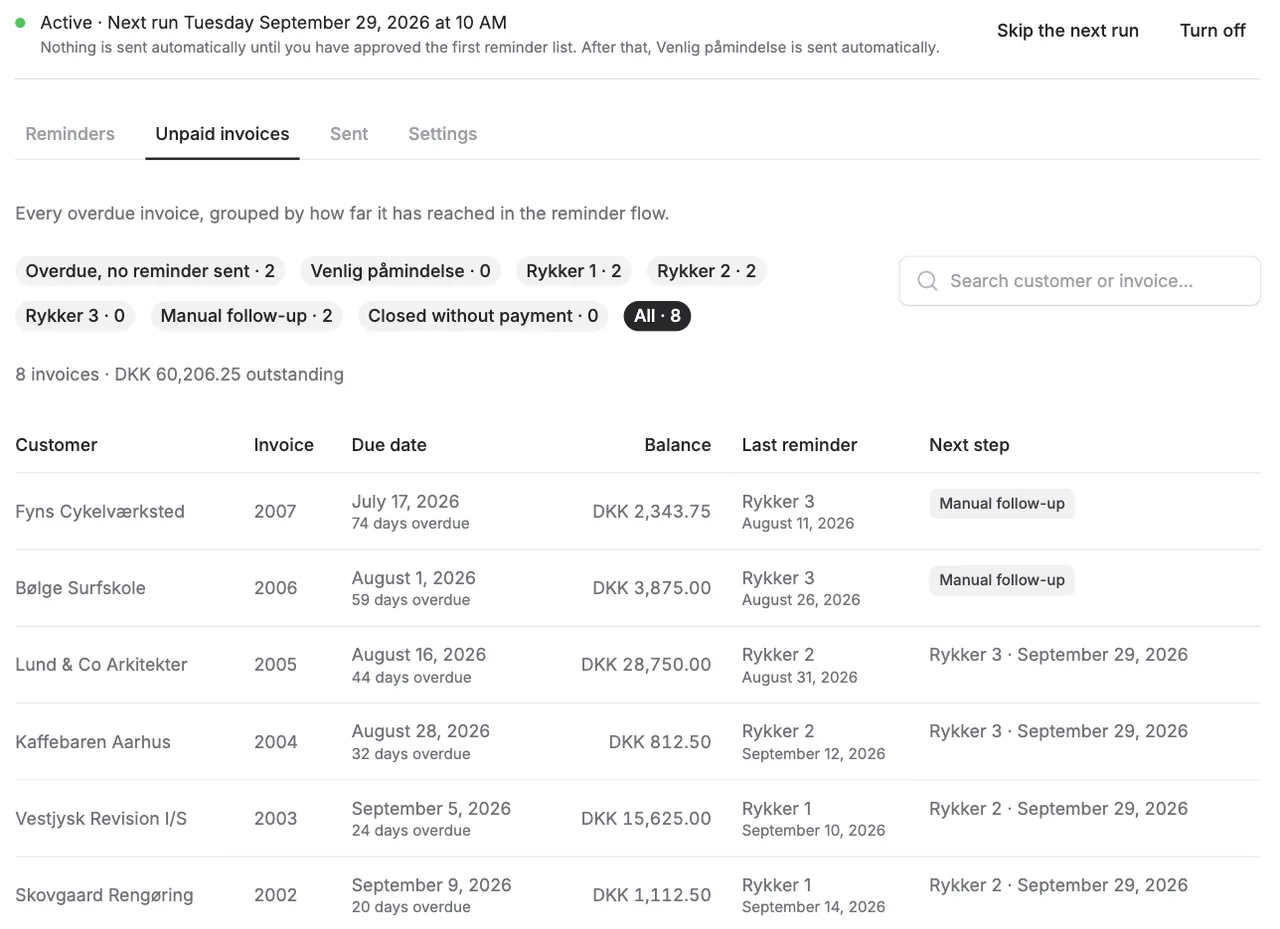
When you switch Payment reminders on, nothing is sent by itself. You always review and approve the first reminder list. Only after that do the steps that don’t require approval send themselves at the scheduled runs. This applies again every time the system is switched off and on, and the status bar at the top shows when that is the case.
Unpaid invoices now uses the full width. The steps sit as filters above the table, each with its number of invoices, and you can search by customer name or invoice number. The search looks across all steps, and the number on each step shows where the matching invoices are.
The images were recaptured in the current version of Alunta with fictitious data. They illustrate the features and are not original captures from the publication date.


The people and AI helpers behind the updates
Bo Møller and Emil Højbjerg are the primary developers behind Alunta. They spend most of their time coding, so they have delegated the wording of these explanations to our AI helpers.
The AI helpers write from the updates we have deployed to the product. Bo and Emil are behind the changes and remain responsible for ensuring the information reflects what was actually released.