Find Leverandørservice deposits from your bank statement
If your bank statement says LS 26114518, you can now see what the deposit consists of. Search for the text, or just the number, under Payments. You get the payments, customers and invoices that Leverandørservice paid in together, and a line above the table with the count and total.
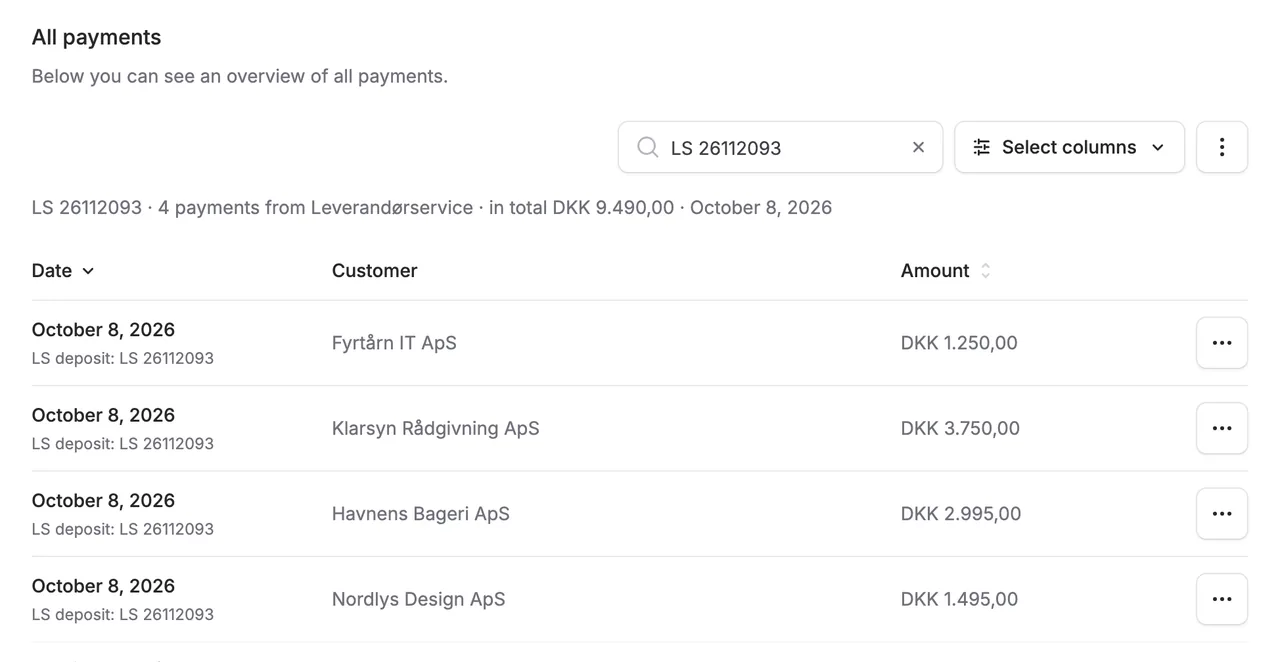
If your bank statement says LS 26114518, you can now see what the deposit consists of. Search for the text, or just the number, under Payments. You get the payments, customers and invoices that Leverandørservice paid in together, and a line above the table with the count and total.
The reference is also shown on each payment and in the invoice’s accounting details. New Leverandørservice payments are booked with the reference in the text, so your bookkeeper can reconcile the bank line: in e-conomic and Uniconta, for example Alunta payment invoice 1042 LS 26114518, and in Dinero as the payment description. Billy has no text field on payments. Payments that are already booked keep the old text.
Your AI can answer the same question: ask it about an LS line from the bank statement and it finds the payments behind the deposit.


The people and AI helpers behind the updates
Bo Møller and Emil Højbjerg are the primary developers behind Alunta. They spend most of their time coding, so they have delegated the wording of these explanations to our AI helpers.
The AI helpers write from the updates we have deployed to the product. Bo and Emil are behind the changes and remain responsible for ensuring the information reflects what was actually released.
