What you get with Payment reminders
Your own sequence
Add and name steps, set the days between them and choose which emails require approval.
Review before sending
See customers, invoices and the next action. The first list always needs approval before automatic sending starts.
Help customers update cards
Follow up on confirmed card failures with a portal link where customers can update their card.
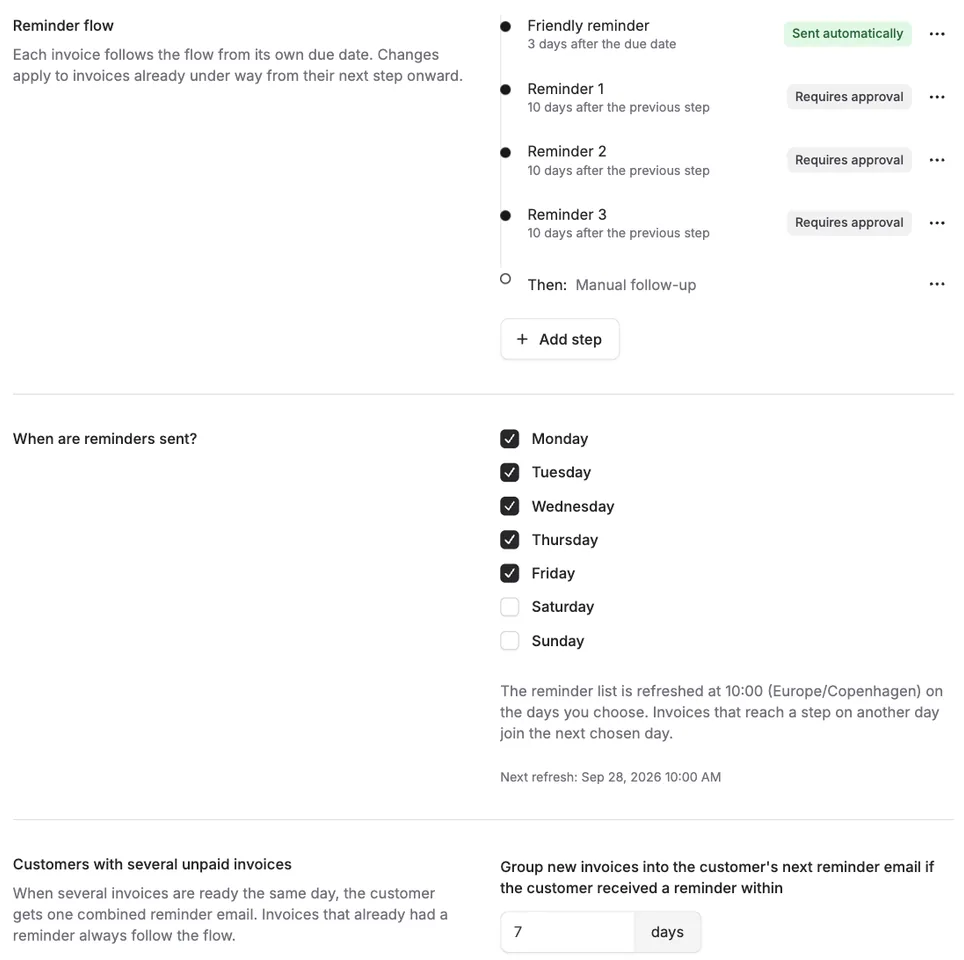
From a friendly reminder to manual follow-up
Each invoice follows its sequence from its due date. Choose run days and time between steps. Invoices ready together can be combined in one customer email. Unpaid invoices move to manual follow-up after the final step.
Control where it matters
Alunta checks payments again immediately before sending and holds back uncertain cases. Skip an individual invoice or find the next action on the reminder list. The first list requires approval, including after disabling and re-enabling the app.
- Your own sequence
- Review before sending
- Help customers update cards
Get started with Payment reminders
An owner or administrator enables Payment reminders under Apps & integrations. Configure the sequence and run days in Settings → Payment reminders, review Customer emails and approve the first reminder list.
Explore more possibilities in Alunta
Cashflow forecast
Plan six months ahead with a forecast based on your subscriptions and invoices. Switch between expected payments and invoicing and explore the customers behind each amount.
Explore Cashflow forecastCustomer communication
Customise customer emails with your wording and logo. Let the portal, checkout and new documents follow each customer’s choice of eight languages.
Explore Customer communicationAI access (MCP)
Connect Alunta to a compatible AI assistant. Get answers about customers, MRR, invoices and bookkeeping based on your own business data.
Explore AI access (MCP)From the product team
Updates about Payment reminders
Read the product team’s own updates about Payment reminders, with details of new capabilities and improvements.
- Read the update
A calmer reminder overview, and skip a single invoice
- Read the update
Payment reminders sends nothing automatically until you have approved the first list
- Read the update
Design your own reminder flow, and see unpaid invoices in one place
- Read the update
Payment reminders: Follow up on unpaid invoices and failed card payments
Questions and answers about Payment reminders
Which integrations are supported?
Invoice checks support e-conomic and DKK invoices. Card follow-up supports DKK subscriptions with Stripe or QuickPay where the plan allows it.
Does Alunta add fees or interest?
No. The reminder system does not add fees or interest and does not refer cases to debt collection.
Could customers receive duplicate reminders?
Reminders from your accounting system or payment provider are controlled separately. Review their settings when configuring your Alunta sequence.
