LS: setup guide and clearer mandate statuses
You can now use one setup guide for Leverandørservice, whether you are starting from scratch or moving from another system. Mandate colours also make the recorded evidence clearer.
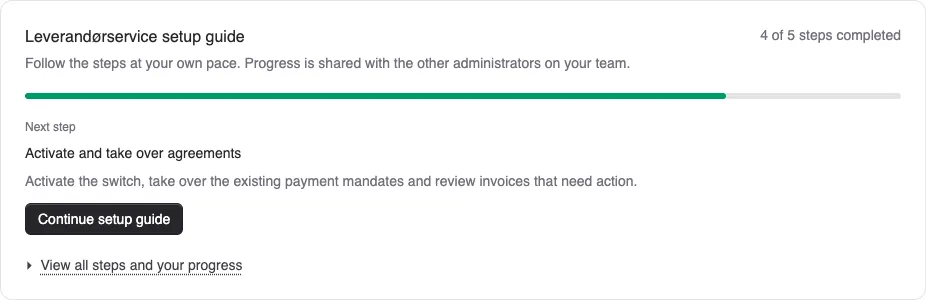
You can now use one setup guide for Leverandørservice, whether you are starting from scratch or moving from another system. Mandate colours also make the recorded evidence clearer.
Setup at a glance: Open the guide from your LS settings. It appears as a dashboard widget with steps, progress and links to the relevant pages. A small guide panel helps you return to the guide along the way. You can remove the widget and add it again without losing progress.
If you already use Leverandørservice, you can choose an optional review of your setup. Checkmarks are saved personally and do not change your LS settings, mandates or collections. Progress in the actual setup flow for a new agreement or a provider switch remains shared by your team’s administrators.
What do the colours mean? The mandate overview and each customer’s LS card show:
- Yellow Active: The mandate is active in Alunta, but no evidence that it works has been recorded.
- Green Active: There is a completed positive live collection, a received LS mandate file or a manual confirmation. A mandate file documents registration, while a completed collection documents a debit.
- Red Rejected: The mandate has been rejected.
- Grey Cancelled: The mandate has been cancelled.
Hover over the status badge or tap it to see the explanation and the recorded evidence.
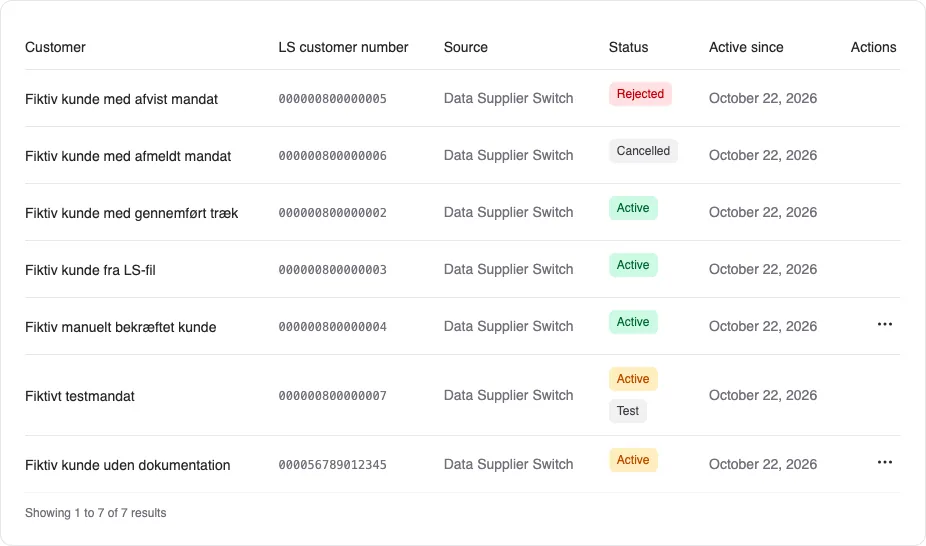
Manual confirmation: An administrator can choose Confirm manually from the mandate’s three-dot menu when they know the mandate works, for example from earlier collections or documentation. The confirmation is shared with the team and shows the name and time. It is your team’s own assessment, not a check with LS. It can be removed again from the same menu.
Existing collections continue as before. The colour and a manual confirmation do not change whether a mandate can be used for collection. An existing mandate may therefore appear yellow even if you already use it.


The people and AI helpers behind the updates
Bo Møller and Emil Højbjerg are the primary developers behind Alunta. They spend most of their time coding, so they have delegated the wording of these explanations to our AI helpers.
The AI helpers write from the updates we have deployed to the product. Bo and Emil are behind the changes and remain responsible for ensuring the information reflects what was actually released.
