e-conomic setup guide on the dashboard
When you connect e-conomic from your settings, a guide on your dashboard now takes you through the bookkeeping choices one step at a time. It shows how far you have come, and Open step takes you straight to the right setting.
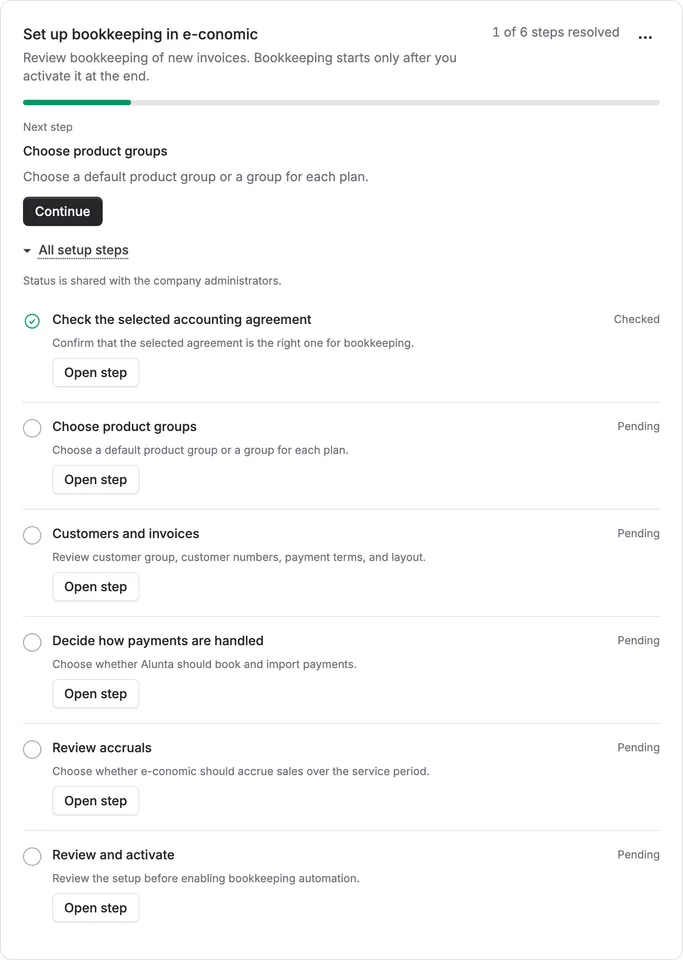
When you connect e-conomic from your settings, a guide on your dashboard now takes you through the bookkeeping choices one step at a time. It shows how far you have come, and Open step takes you straight to the right setting.
The guide has six steps:
- Check the selected accounting agreement
- Choose product groups
- Customers and invoices
- Decide how payments are handled
- Review accruals
- Review and activate
Bookkeeping only starts when you activate it. On a new connection, Alunta sends no invoices or payments to e-conomic until you have reviewed your choices and selected Activate e-conomic in the last step. Until then, Alunta only creates the products you map to your plans.
Already using e-conomic? Select Start review in your e-conomic settings to check your current choices for invoices, payments and accruals. The review itself does not change your bookkeeping or your saved settings.
The guide is for owners and administrators, and its status is shared with your company’s other administrators. You can hide it from your own dashboard with the three-dot menu without losing progress. To bring it back, add Bookkeeping in e-conomic under Edit layout.


The people and AI helpers behind the updates
Bo Møller and Emil Højbjerg are the primary developers behind Alunta. They spend most of their time coding, so they have delegated the wording of these explanations to our AI helpers.
The AI helpers write from the updates we have deployed to the product. Bo and Emil are behind the changes and remain responsible for ensuring the information reflects what was actually released.
