Tiered subscriptions in self-service checkout
Your customers can now sign up for a tiered subscription directly from self-service checkout - just like flat-rate, license-based, and usage-based plans.
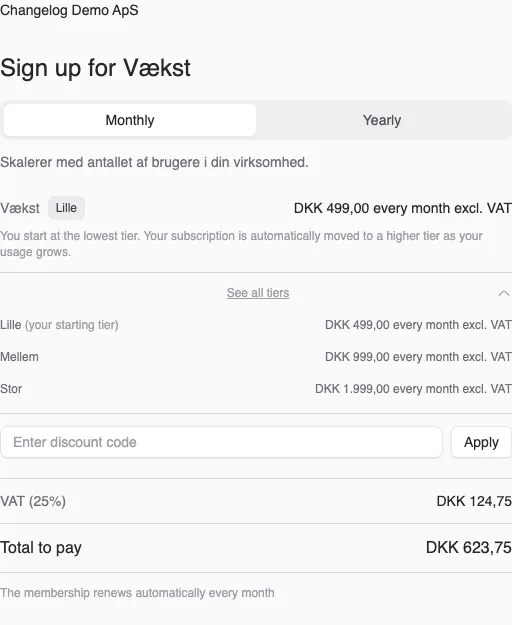
Your customers can now sign up for a tiered subscription directly from self-service checkout - just like flat-rate, license-based, and usage-based plans.
The screenshots show fictitious data in the current version of Alunta. Click an image to view it full size.
How it works
The customer is automatically placed on the lowest tier at signup. There is no tier picker in checkout - instead the customer is moved to a higher tier later, automatically, once their usage crosses the limits you have configured.
On the checkout page the customer can see which tier they are starting on, plus an overview of all tiers and prices, so they know what it costs as they grow.
Pre-seed via the API
If you create a checkout session through the API and already know what the customer’s usage is (e.g. seats or API calls), you can pass a usage_parameters object in metadata. The customer then lands directly on the correct tier from day 1 instead of starting on the lowest and being upgraded shortly after.
Example:
"metadata": {
  "usage_parameters": {
    "seats": 25,
    "api_calls": 10000
  }
}
See the full documentation under /checkout-sessions in the API reference.


The people and AI helpers behind the updates
Bo Møller and Emil Højbjerg are the primary developers behind Alunta. They spend most of their time coding, so they have delegated the wording of these explanations to our AI helpers.
The AI helpers write from the updates we have deployed to the product. Bo and Emil are behind the changes and remain responsible for ensuring the information reflects what was actually released.
