Customer overview now has a table view
If you use usage parameters for your customers, you can now compare values across them.
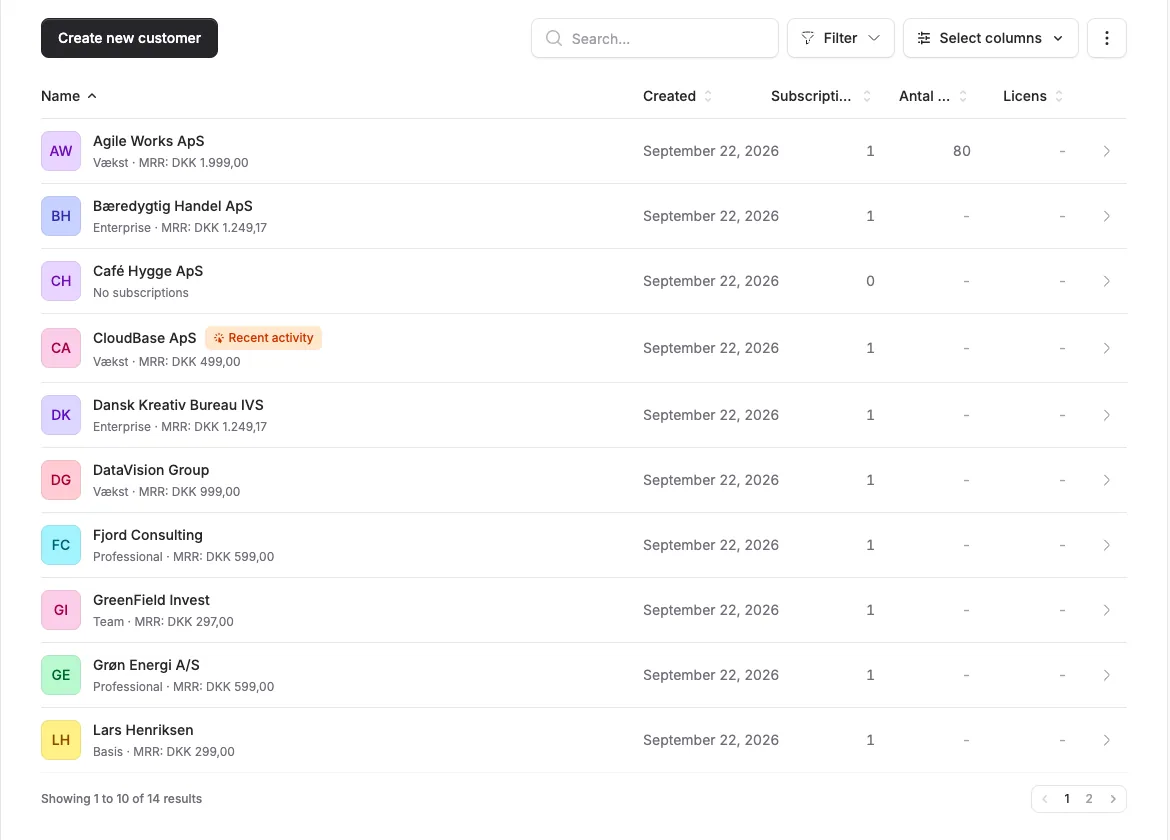
If you use usage parameters for your customers, you can now compare values across them.
The screenshots show fictitious data in the current version of Alunta. Click an image to view it full size.
What’s new
From the menu in the top-right of the customer overview you can now switch between list and table view. In table view each usage parameter gets its own column, and clicking a column header sorts by it.
- Tracking usage or other metrics for your customers? Find your top customers in one click.
- Empty cells show as a dash so you can see at a glance where data is missing.
- If your team has more than three usage parameters, use “Select data” to choose which ones to show as columns.
Which view do I see by default?
If your team tracks one or more usage parameters, you land directly in the table view. Otherwise you stay in the familiar list view. If you switch view, Alunta remembers your choice for next time.
A value in a usage column is the latest reported value, not necessarily a total for the whole period. An empty cell means that no value was reported; it is different from zero. The customer overview can be filtered, and the CSV export follows search and filters but includes all usage parameters, so the export can be broader than the table.


The people and AI helpers behind the updates
Bo Møller and Emil Højbjerg are the primary developers behind Alunta. They spend most of their time coding, so they have delegated the wording of these explanations to our AI helpers.
The AI helpers write from the updates we have deployed to the product. Bo and Emil are behind the changes and remain responsible for ensuring the information reflects what was actually released.
