Update a customer's master data from CVR
You've always been able to see company data from CVR under "Insights" on your business customers. Now you can act on it too. When CVR has newer information than what you have on file in Alunta, you get a "CVR data changed" badge on the customer - plus a filter in the customer overview so they're all in one place.
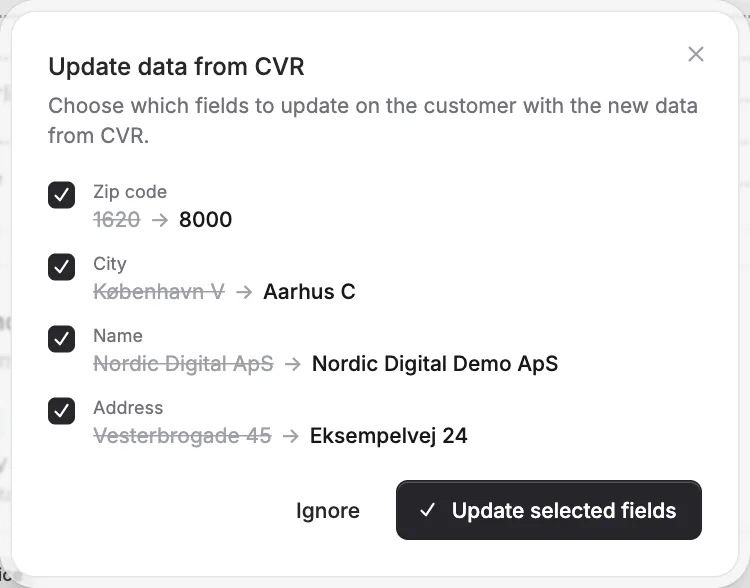
You’ve always been able to see company data from CVR under “Insights” on your business customers. Now you can act on it too. When CVR has newer information than what you have on file in Alunta, you get a “CVR data changed” badge on the customer - plus a filter in the customer overview so they’re all in one place.
The screenshots show fictitious data in the current version of Alunta. Click an image to view it full size.
On the customer’s page, review the changes field by field - name, address, zip code, city, phone and email - tick the ones you want to bring over, and update the customer’s master data in a click. You decide on every field: nothing changes automatically, and if a suggestion doesn’t fit, just ignore it.
CVR insights require a Danish CVR identifier and can be delayed. Review each suggestion before applying it; a marker says that a difference exists, not that CVR information is always complete or correct for your workflow.


The people and AI helpers behind the updates
Bo Møller and Emil Højbjerg are the primary developers behind Alunta. They spend most of their time coding, so they have delegated the wording of these explanations to our AI helpers.
The AI helpers write from the updates we have deployed to the product. Bo and Emil are behind the changes and remain responsible for ensuring the information reflects what was actually released.
