Avoid rejected Leverandørservice collections with bank limits
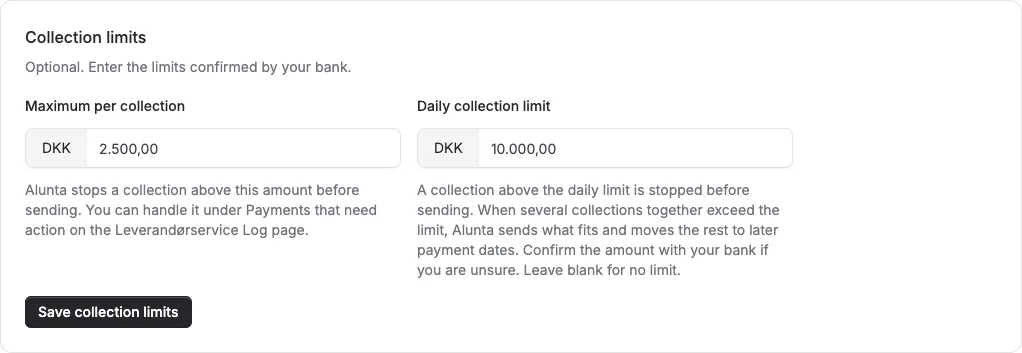
You can now enter both your bank's daily Leverandørservice limit and the maximum for a single collection. An individual collection above the maximum is stopped before sending. When the day's combined collections exceed the daily limit, Alunta sends what fits and moves the remainder to later bank days.
Historical retrospective - July 2026 This article was written afterwards and describes the feature as it worked during the stated period.
You can now enter both your bank’s daily Leverandørservice limit and the maximum for a single collection. An individual collection above the maximum is stopped before sending. When the day’s combined collections exceed the daily limit, Alunta sends what fits and moves the remainder to later bank days.
The screenshots show fictitious data in the current version of Alunta. Click an image to view it full size.
Stopped collections appear under Payments that need action, where you can raise a bank-confirmed limit, schedule another attempt, or handle the payment another way.
Follow status after limit checks
A bank limit determines scheduling; it is not a payment receipt. Afterwards check whether each collection was accepted, rejected, moved to a later bank day, or is still pending. Use the concrete action shown if a collection enters recovery. See the current guide (Markdown file, AI agent-friendly)


The people and AI helpers behind the updates
Bo Møller and Emil Højbjerg are the primary developers behind Alunta. They spend most of their time coding, so they have delegated the wording of these explanations to our AI helpers.
The AI helpers write from the updates we have deployed to the product. Bo and Emil are behind the changes and remain responsible for ensuring the information reflects what was actually released.
