Manage users for the whole company in one place
If you belong to several Alunta accounts under the same CVR number and are an owner or administrator in at least one of them, the company menu now has a Users and activity item. Here you can see and manage the users of every account where you are an owner or administrator, in one list.
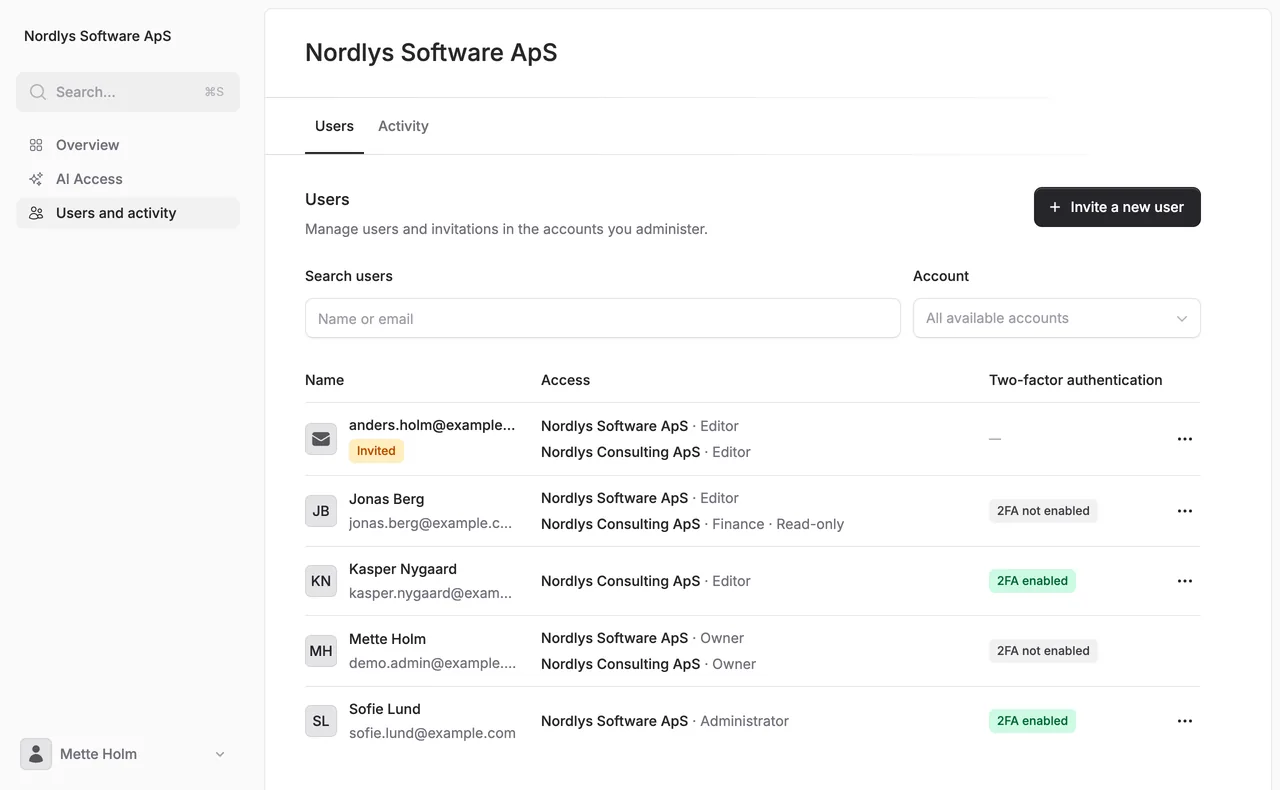
If you belong to several Alunta accounts under the same CVR number and are an owner or administrator in at least one of them, the company menu now has a Users and activity item. Here you can see and manage the users of every account where you are an owner or administrator, in one list.
Users: The list shows each person once with their access in each account, invitations awaiting acceptance, and whether two-factor authentication is enabled. You can search by name or email and filter on a single account. Use the three-dot menu next to a person to open Manage access, where you can change a role, remove access or cancel an invitation for each account.
One invitation for several accounts: Choose Invite a new user, enter the email address, and pick an access level and the accounts the person should have access to. The person receives one email listing all the accounts instead of one email per account. The access level applies to the accounts you selected and no others. If your company uses the Financial overview, you can also invite people to it from here.
Activity: The Activity tab brings together the activity log from the company’s accounts, and you can filter on a single account.
The page grants no new access. You only see and change accounts where you are already an owner or administrator, and each change is logged in the account it applies to.


The people and AI helpers behind the updates
Bo Møller and Emil Højbjerg are the primary developers behind Alunta. They spend most of their time coding, so they have delegated the wording of these explanations to our AI helpers.
The AI helpers write from the updates we have deployed to the product. Bo and Emil are behind the changes and remain responsible for ensuring the information reflects what was actually released.