A clearer overview of invoicing and card payments
Invoicing tasks and failed card payments now use regular lists with consistent columns and concise statuses. Compare customers, amounts and statuses, and expand the details for each case. On mobile, the information is stacked vertically.
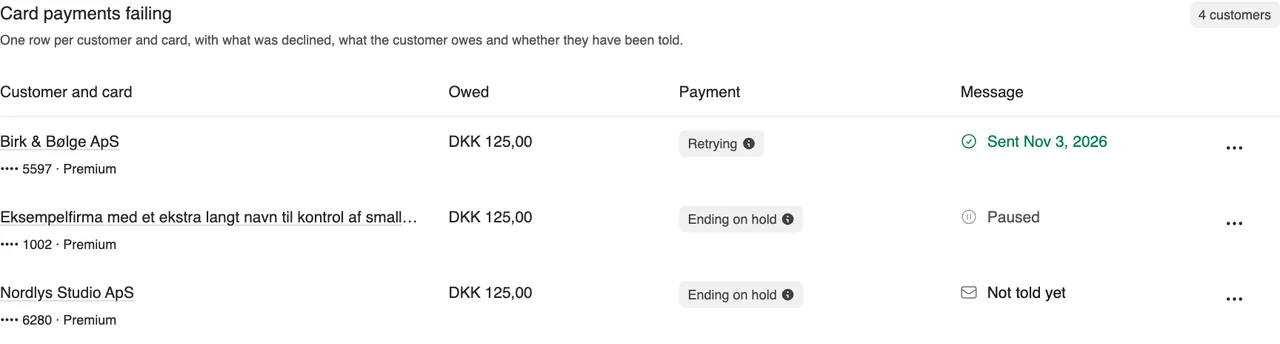
Invoicing tasks and failed card payments now use regular lists with consistent columns and concise statuses. Compare customers, amounts and statuses, and expand the details for each case. On mobile, the information is stacked vertically.
Long company names are shortened with “…”, with the full name available on hover or focus. The payment column shows one short status with an explanation and any dates in a tooltip. The tooltip also opens using the keyboard or touch. Ending on hold appears directly in the row when automatic ending awaits action.
Under Failed card payments, payment status and customer message status appear separately. The three-dot menu groups View details, Send message and Handle case. Handle case opens the familiar choices to continue by invoice or end the subscription. Send message remains available when there is a message to send.
On the dashboard, affected customers appear as clear list items with their cards. You see up to three customers and the number of additional customers. The button opens the complete list.
The invoicing page also distinguishes open tasks from activity in the selected period. Open tasks remain visible even when they fall outside that period.


The people and AI helpers behind the updates
Bo Møller and Emil Højbjerg are the primary developers behind Alunta. They spend most of their time coding, so they have delegated the wording of these explanations to our AI helpers.
The AI helpers write from the updates we have deployed to the product. Bo and Emil are behind the changes and remain responsible for ensuring the information reflects what was actually released.