Slack notifications: choose a channel and events
In the historical version from January 2026, all notification types were enabled when Slack was connected. The text below describes that earlier workflow and is not the current setup instruction.
Changed since - March 2026
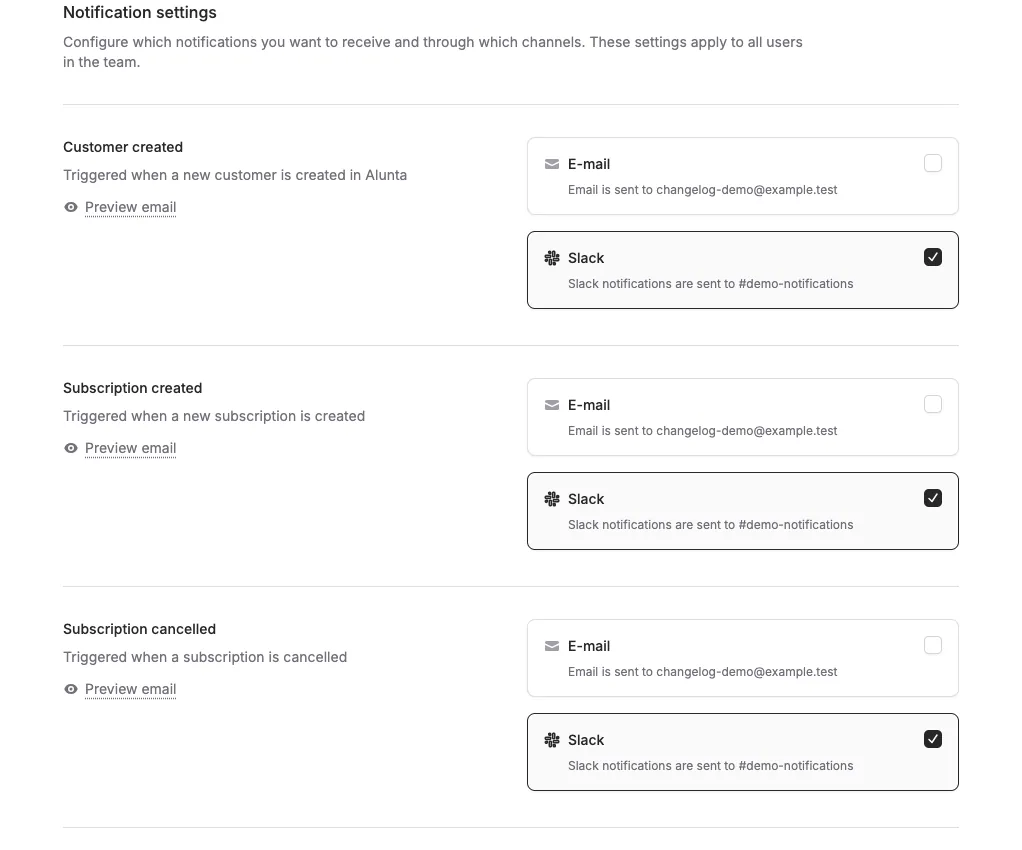
When you connect Slack, choose a workspace and channel under Settings → Slack, save the choice, and send a test message before team notifications are created. Then choose the events the team should receive. See the integrations and notifications guide (Markdown file, AI agent-friendly) for the current workflow.
In the historical version from January 2026, all notification types were enabled when Slack was connected. The text below describes that earlier workflow and is not the current setup instruction.
The screenshots show fictitious data in the current version of Alunta. Click an image to view it full size.
What will you be notified about?
- New subscriptions when a customer signs up
- Payments received with amount and customer name
- Cancellations so you can react quickly
- Renewals to keep you updated on upcoming payments
You can always customize which notifications you receive under Settings after setup. All notifications are sent with your company name as the sender.
Historical background - August 2025 to April 2026
This article was expanded afterwards to bring the development of team notifications together. In the early version, Slack notifications were enabled when Slack was connected. Later, you could choose a workspace and channel, send a test message, and choose events more precisely under Settings.
Team notifications are messages for your team. They are different from customer emails sent on the team’s behalf to end customers, and from webhooks sent to an external system. For example, a paid invoice can trigger an email or Slack message to the team, while an invoice.paid webhook event is intended for an integration.
If a channel is missing, the connected Slack app must be able to see and write to it. A changed scope or workspace may require reconnecting. Always check the event in Alunta’s settings and look for the test message before relying on Slack as the only follow-up.


The people and AI helpers behind the updates
Bo Møller and Emil Højbjerg are the primary developers behind Alunta. They spend most of their time coding, so they have delegated the wording of these explanations to our AI helpers.
The AI helpers write from the updates we have deployed to the product. Bo and Emil are behind the changes and remain responsible for ensuring the information reflects what was actually released.
