Credit any invoice - line by line
Until now, "Revert period" on a subscription was the only way to create a credit note. It didn't cover one-off invoices, and one-off charges on a subscription invoice were not always credited with the period. You can now credit an invoice directly and choose exactly what to include.
Historical retrospective - May 2026 This article was written afterwards and describes the feature as it worked during the stated period.
Until now, “Revert period” on a subscription was the only way to create a credit note. It didn’t cover one-off invoices, and one-off charges on a subscription invoice were not always credited with the period. You can now credit an invoice directly and choose exactly what to include.
The screenshots show fictitious data in the current version of Alunta. Click an image to view it full size.
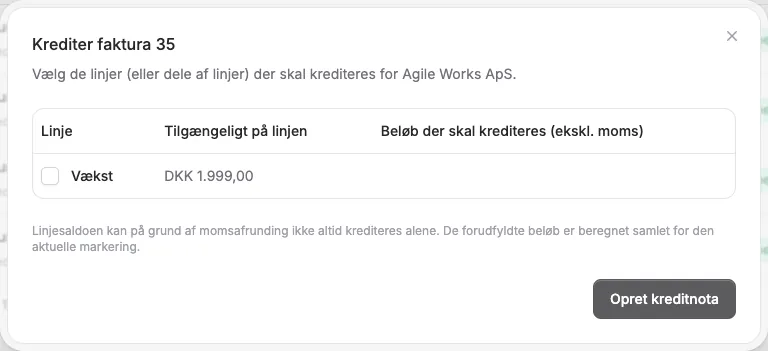
This screenshot uses the Danish interface.
What’s new
- Credit directly from the invoice. Open the menu next to an invoice under Invoices (or on a customer’s Invoices tab), and pick “Credit invoice”.
- Choose lines and amounts. You can credit individual lines or only part of an amount. This works for one-off invoices, subscription invoices, and mixed invoices with both period and one-off lines.
- Avoid duplicate credits. Lines that are already fully credited are hidden or marked.
- Refund the card payment at the same time. If the invoice was paid by Stripe or OnPay, you can turn on “Refund payment to customer”. We refund the amount you credit, including VAT. If the refund fails, we do not create the credit note.
- Subscription billing stays accurate. Crediting a subscription period also updates its billing status.
What’s gone
- The “Revert period” button on subscriptions has been replaced by a “Credit invoice” link that takes you to the customer’s invoices. Choose the invoice and the lines you want to credit there.
Historical background: document and money flow
The first line-credit feature focused on choosing document lines. The later workflow makes it clearer that a credit note and refund can be separate choices. Review the selected line and amount, check the original invoice balance, and then follow payment status if money should also be returned. A refund request is not a completed return. See the current guide (Markdown file, AI agent-friendly)


The people and AI helpers behind the updates
Bo Møller and Emil Højbjerg are the primary developers behind Alunta. They spend most of their time coding, so they have delegated the wording of these explanations to our AI helpers.
The AI helpers write from the updates we have deployed to the product. Bo and Emil are behind the changes and remain responsible for ensuring the information reflects what was actually released.
