Card payments failing: one place, one message and a way out
When a customer's card payment fails, you now find the case in one place, the customer gets one kind of message, and you can finish it safely.
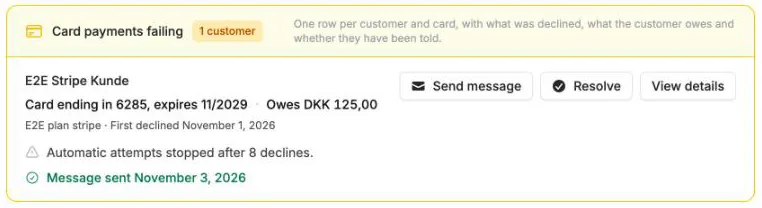
When a customer’s card payment fails, you now find the case in one place, the customer gets one kind of message, and you can finish it safely.
One place on the dashboard
The dashboard brings it together in one topic, Card payments failing, which counts customers instead of periods. The list shows one row per customer and card: which card, what failed and since when, what the customer owes, and whether the customer has been told (“Not told yet” or when a message was last sent). Under View details you see every unpaid period with its attempts and the customer’s open invoices.
Telling the customer
When a card payment fails after this update, the customer gets the Payment could not be completed email at once, after the follow-ups you chose, and before an automatic cancellation. When a card stops being tried after repeated declines, a case is opened for the unpaid periods on the card that the customer is not already being told about, such as another subscription on the same card. The customer does not get an extra email about the stop itself. Cards that were already declined or stopped before the update do not get an email automatically: they show “Not told yet” in the list. With Send message in the list you send the case’s next message right away and can preview exactly the email that is sent.
It is now the only email about a failing card, so the customer no longer gets several emails about the same amount. The button in the email is a direct link for the customer: it opens the customer portal without logging in, where the card can be replaced and open invoices paid. If you send the message to recipients other than the customer’s own email address, their button leads to the customer portal login, because the link would otherwise sign them in as the customer.
Customers now also automatically get an email that their card expires soon, up to 30 days before, so it can be replaced before the next payment. It is only sent while the Payment could not be completed email is switched on, and is turned off in the same place.
Resolve
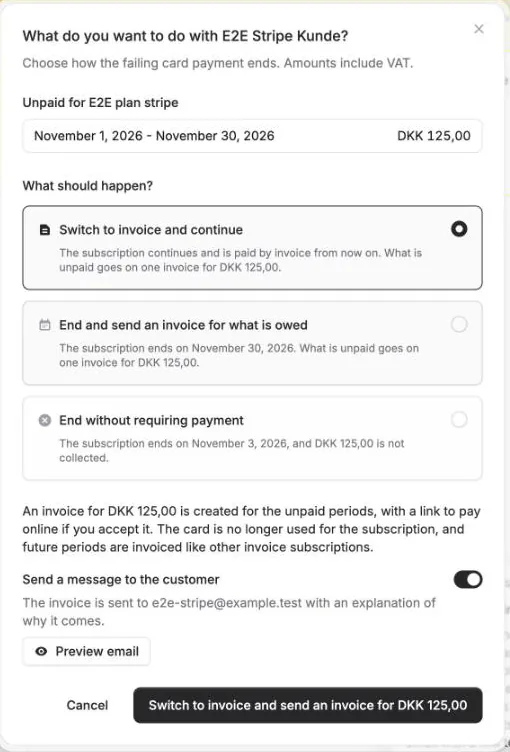
With Resolve you choose what happens to the subscription. Amounts include VAT, and the button repeats what happens and for which amount:
- Switch to invoice and continue - the subscription continues and is paid by invoice from now on. What is unpaid goes on one invoice at once, with a link to pay online if you accept it.
- End and send an invoice for what is owed - what is unpaid goes on one invoice, and the subscription ends at the end of the current period.
- End without requiring payment - the subscription ends, the unpaid periods are not collected, and the subscription’s open invoices are credited. The credit notes are booked but not sent to the customer.
For each choice you decide whether the customer is told, and you can preview the one email that is sent: the invoice with an explanation of why it comes, or the message that the subscription has ended. If the customer receives invoices by EAN or pays them through Leverandørservice, the invoice is delivered or collected that way as usual. If the customer has several subscriptions on the card, you resolve one at a time.
Once the unpaid periods are on an invoice, the messages asking for a new card stop. The Cancel subscription menu item on renewals has been removed: End without requiring payment replaces it and can only be used on a subscription whose card payment actually failed.


The people and AI helpers behind the updates
Bo Møller and Emil Højbjerg are the primary developers behind Alunta. They spend most of their time coding, so they have delegated the wording of these explanations to our AI helpers.
The AI helpers write from the updates we have deployed to the product. Bo and Emil are behind the changes and remain responsible for ensuring the information reflects what was actually released.