See delivery details for your invoice emails
In the invoice overview, hover over the delivery icon next to the invoice number to see details of the latest invoice email. When delivery information is available, you can see whether the recipient’s mail server accepted the email or a delivery problem was reported.
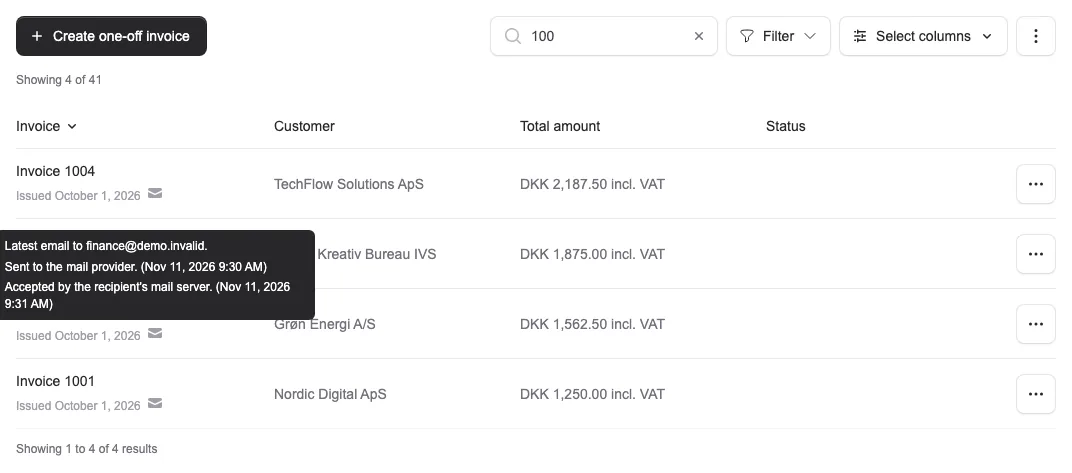
In the invoice overview, hover over the delivery icon next to the invoice number to see details of the latest invoice email. When delivery information is available, you can see whether the recipient’s mail server accepted the email or a delivery problem was reported.
You will also see a warning on the customer card and in the send dialog if the email address’s domain could not be found or was not set up to receive email at the last check. Check the address for typos. The warning does not prevent you from saving or sending.
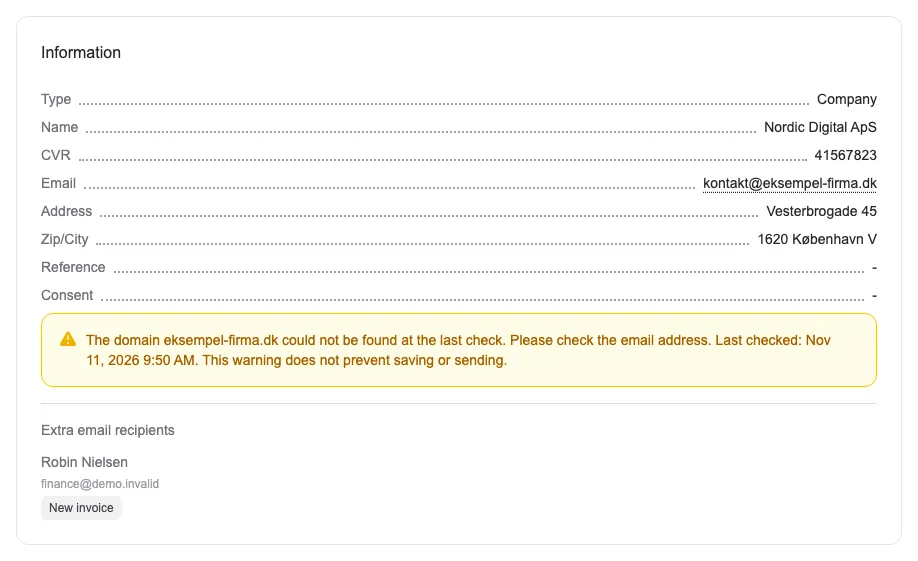
Delivery information may be delayed, and older emails may have no status. Acceptance does not confirm that an email reached the inbox or was read.


The people and AI helpers behind the updates
Bo Møller and Emil Højbjerg are the primary developers behind Alunta. They spend most of their time coding, so they have delegated the wording of these explanations to our AI helpers.
The AI helpers write from the updates we have deployed to the product. Bo and Emil are behind the changes and remain responsible for ensuring the information reflects what was actually released.