What you get with Company overview
Shared metrics
View widgets combining company accounts in one currency.
Accounting access
Invite your bookkeeper or auditor to selected accounts with one read-only invitation.
Central AI settings
Review and change account permissions in one table, with a change review before saving.
The company defines the group
Accounts with the same CVR number appear under one company in the account switcher. Select the company to see a shared dashboard. Accounts with other CVR numbers remain separate, even if you have access to them.
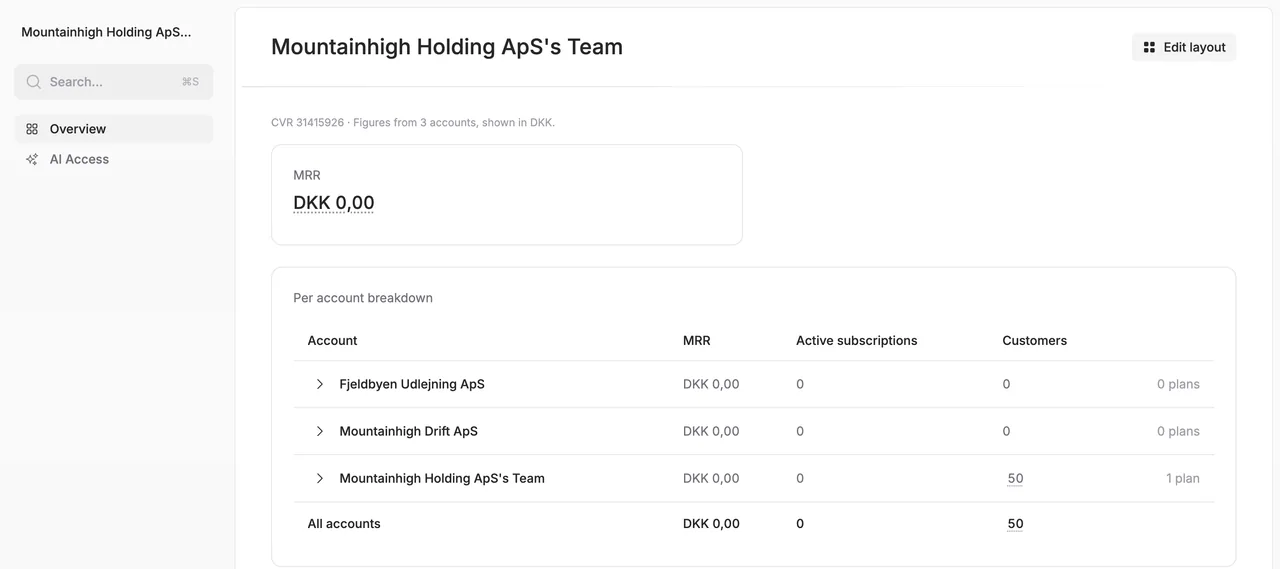
An overview for each person
Each user has a personal company layout and can choose and move widgets. A company AI connection covers only its CVR number and follows the person’s access in each account.
- Shared metrics
- Accounting access
- Central AI settings
Get started with Company overview
Open the account switcher and select the company. Customise its dashboard widgets. Invite someone with Accounting · Read access under Users and activity, selecting which accounts the invitation covers.
Explore more possibilities in Alunta
Cashflow forecast
Plan six months ahead with a forecast based on your subscriptions and invoices. Switch between expected payments and invoicing and explore the customers behind each amount.
Explore Cashflow forecastAI access (MCP)
Connect Alunta to a compatible AI assistant. Get answers about customers, MRR, invoices and bookkeeping based on your own business data.
Explore AI access (MCP)Alunta Radar
Radar checks your active business customers in Denmark’s CVR register every day. Get notified of important changes and see the subscription value they may affect.
Explore Alunta RadarFrom the product team
Updates about Company overview
Read the product team’s own updates about Company overview, with details of new capabilities and improvements.
Questions and answers about Company overview
Can a bookkeeper change data?
Accounting · Read access can read bookkeeping data, invoices and payments and use the cross-account overview. It cannot change data, including through AI.
Who can change AI permissions across accounts?
You can change only accounts where you are an administrator. Before saving, Alunta shows exactly which permissions change in which accounts. Changes are logged separately in each account.
Does AI automatically combine account figures?
The company dashboard shows combined figures. AI tools do not automatically add figures across accounts. Customer changes through AI still require a connection to one specific account.
