Give your bookkeeper or accountant access to all your accounts at once
If you have several Alunta accounts that book into the same accounting system, you can now give your bookkeeper, accountant or finance person access to all of them in one step.
If you have several Alunta accounts that book into the same accounting system, you can now give your bookkeeper, accountant or finance person access to all of them in one step.
Finance access follows your accounting
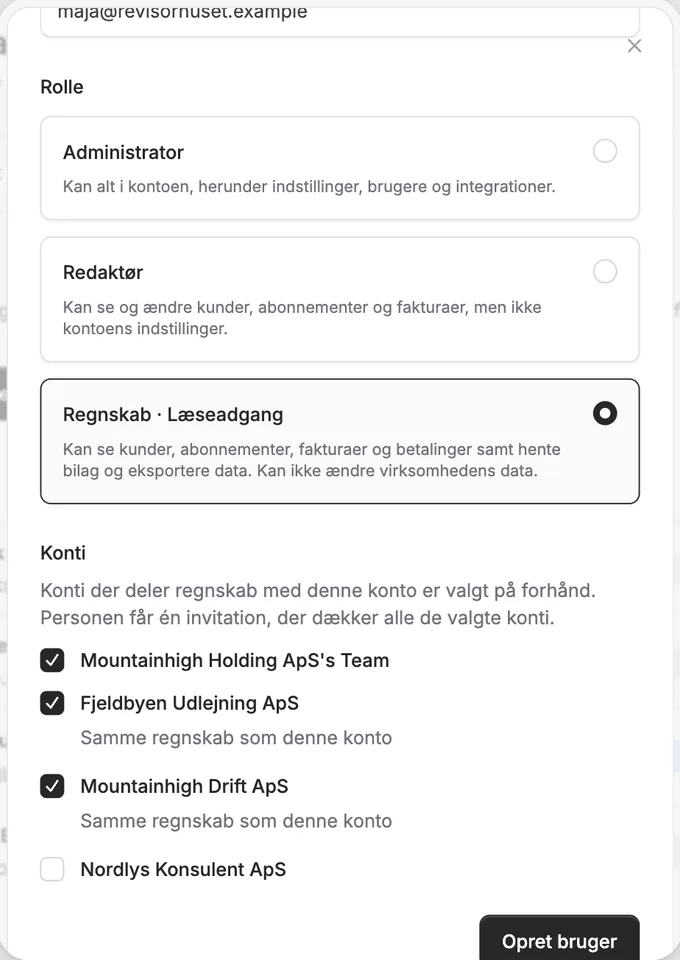
When you invite someone with the Finance · Read-only role under Settings → Users and activity, we list the accounts you run. Accounts that book into the same accounting agreement as the account you are in are selected in advance. Untick any account the person should not have access to. The person receives one invitation covering all the selected accounts.
The Finance · Read-only role now includes finance access: the person can read bookkeeping data, invoices and payments, also through their own AI, and can use the overview across accounts. They cannot change anything. Under Settings → AI Access you can also give finance access to someone who already has another role.
One AI connection for all your accounts
When you connect your AI, you can now choose All my accounts instead of one account. The connection follows your access in each account, including accounts you get access to later, and the AI asks which account you mean when it is unclear. The tools never add up figures from different accounts.
Customer changes through AI still require a connection to one specific account. An administrator can always remove their account from a member’s connection under Settings → AI Access without affecting the member’s other accounts.


The people and AI helpers behind the updates
Bo Møller and Emil Højbjerg are the primary developers behind Alunta. They spend most of their time coding, so they have delegated the wording of these explanations to our AI helpers.
The AI helpers write from the updates we have deployed to the product. Bo and Emil are behind the changes and remain responsible for ensuring the information reflects what was actually released.
