Require extra customer information in self-service
Invoice information requirements depend on customer type, transaction and applicable rules. You can now require customer address and business registration details in self-service.
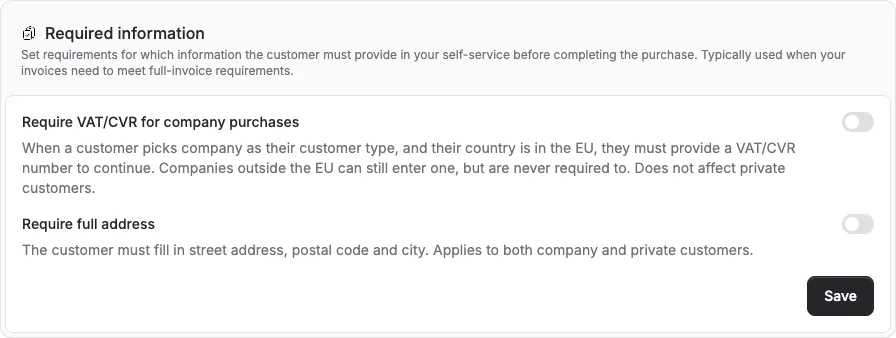
Invoice information requirements depend on customer type, transaction and applicable rules. You can now require customer address and business registration details in self-service.
The screenshots show fictitious data in the current version of Alunta. Click an image to view it full size.
What’s new
- Require VAT/CVR for company purchases: When a customer picks company as their customer type, they must provide a VAT/CVR number to continue. Private customers aren’t affected - they don’t have one.
- Require full address: The customer must provide street, postal code and city. Applies to both company and private customers.
- Both rules apply across one-off invoice checkout, subscription checkout and bundle checkout.
How to turn it on
Go to Settings → Self-service. Under “Required information” you’ll find two switches you can flip on.
Both are off by default, so if you don’t need them you don’t have to do anything - your self-service keeps working exactly as before.


The people and AI helpers behind the updates
Bo Møller and Emil Højbjerg are the primary developers behind Alunta. They spend most of their time coding, so they have delegated the wording of these explanations to our AI helpers.
The AI helpers write from the updates we have deployed to the product. Bo and Emil are behind the changes and remain responsible for ensuring the information reflects what was actually released.
