Payment disputes are handled automatically, and payment links can skip the trial
When a customer disputes a card payment with their bank, Stripe takes the money back. Until now the invoice still showed as paid in Alunta. Now Alunta reopens the invoice for the amount that was taken back and notifies you, so you can respond to the dispute in Stripe. The customer is not charged again automatically, but can pay the reopened invoice through the payment link as usual.
When a customer disputes a card payment with their bank, Stripe takes the money back. Until now the invoice still showed as paid in Alunta. Now Alunta reopens the invoice for the amount that was taken back and notifies you, so you can respond to the dispute in Stripe. The customer is not charged again automatically, but can pay the reopened invoice through the payment link as usual.
If you use e-conomic, Dinero or Uniconta, Alunta books the reversal against the original invoice so your books stay correct. If you use Billy, you get a message asking you to book it yourself, because Billy does not support us doing it automatically. If you win the dispute, Alunta records the money again and the invoice shows as paid.
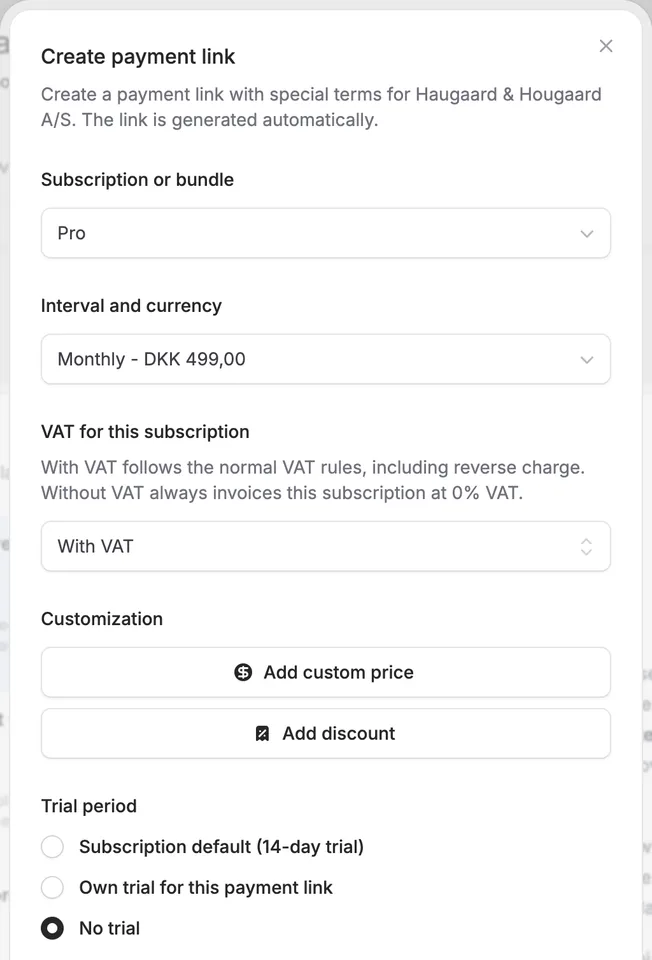
When you create a payment link, you can now also choose No trial. That is useful when a customer already knows the product or should start right away, even though the subscription normally has a trial. You can still use the subscription’s own trial or give a special trial for this link only. Payment links now also work for tiered subscriptions.


The people and AI helpers behind the updates
Bo Møller and Emil Højbjerg are the primary developers behind Alunta. They spend most of their time coding, so they have delegated the wording of these explanations to our AI helpers.
The AI helpers write from the updates we have deployed to the product. Bo and Emil are behind the changes and remain responsible for ensuring the information reflects what was actually released.
