Add extra email recipients per customer
You can now add extra email recipients to a customer, so others like an accountant or a second contact person automatically receive the same emails as the customer.
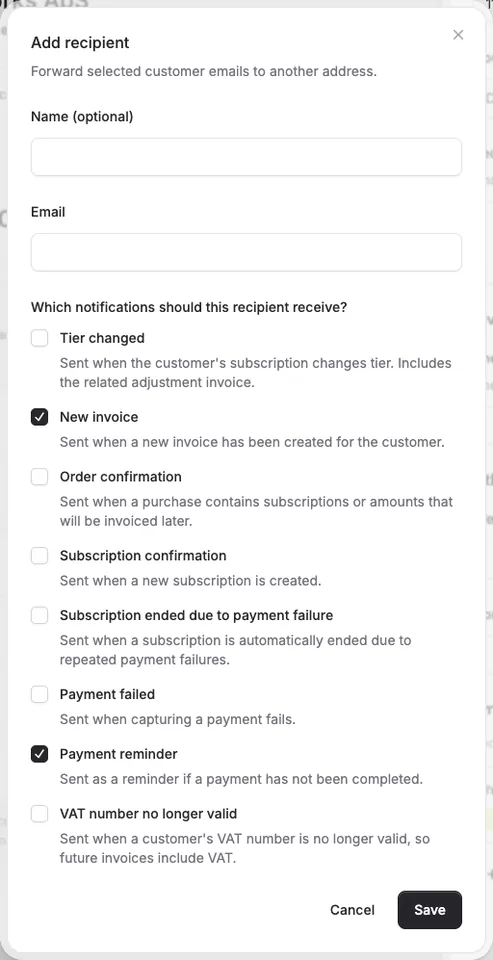
You can now add extra email recipients to a customer, so others like an accountant or a second contact person automatically receive the same emails as the customer.
The screenshots show fictitious data in the current version of Alunta. Click an image to view it full size.
How it works
- Open a customer and add up to 5 extra recipients in the customer form.
- For each recipient, choose exactly which email types they should receive (new invoice, payment reminder, subscription confirmation, and more).
- Extra recipients follow your team’s customer email settings. If you’ve disabled an email type at the team level, neither the customer nor the extra recipients will receive it.
What extra recipients do not receive
Extra recipients never receive the portal login link. That email always goes to the customer only, so no one but the customer can access the customer portal.
If an extra recipient has the same email address as the customer, the recipient is skipped so you don’t get duplicate emails.
How to get started
Go to a customer and scroll to Extra recipients, then add the email address and pick which notifications they should receive.
Customer-level preferences supplement the team’s global choices for automatic delivery. If an email type is disabled globally, it is not sent automatically to additional recipients even when it is selected on the customer. For a manual send now, the operator reviews and confirms an explicit recipient list; that action bypasses the automatic preference gates and sends to the confirmed list. An address matching the customer’s primary address is skipped to avoid duplicates.


The people and AI helpers behind the updates
Bo Møller and Emil Højbjerg are the primary developers behind Alunta. They spend most of their time coding, so they have delegated the wording of these explanations to our AI helpers.
The AI helpers write from the updates we have deployed to the product. Bo and Emil are behind the changes and remain responsible for ensuring the information reflects what was actually released.
