The complete guide to getting started with online payments
Online payments can seem complicated, but they do not have to be. This guide gives you a clear overview of payment gateways, acquiring agreements and how Alunta automates subscriptions, invoices and card payments, step by step.

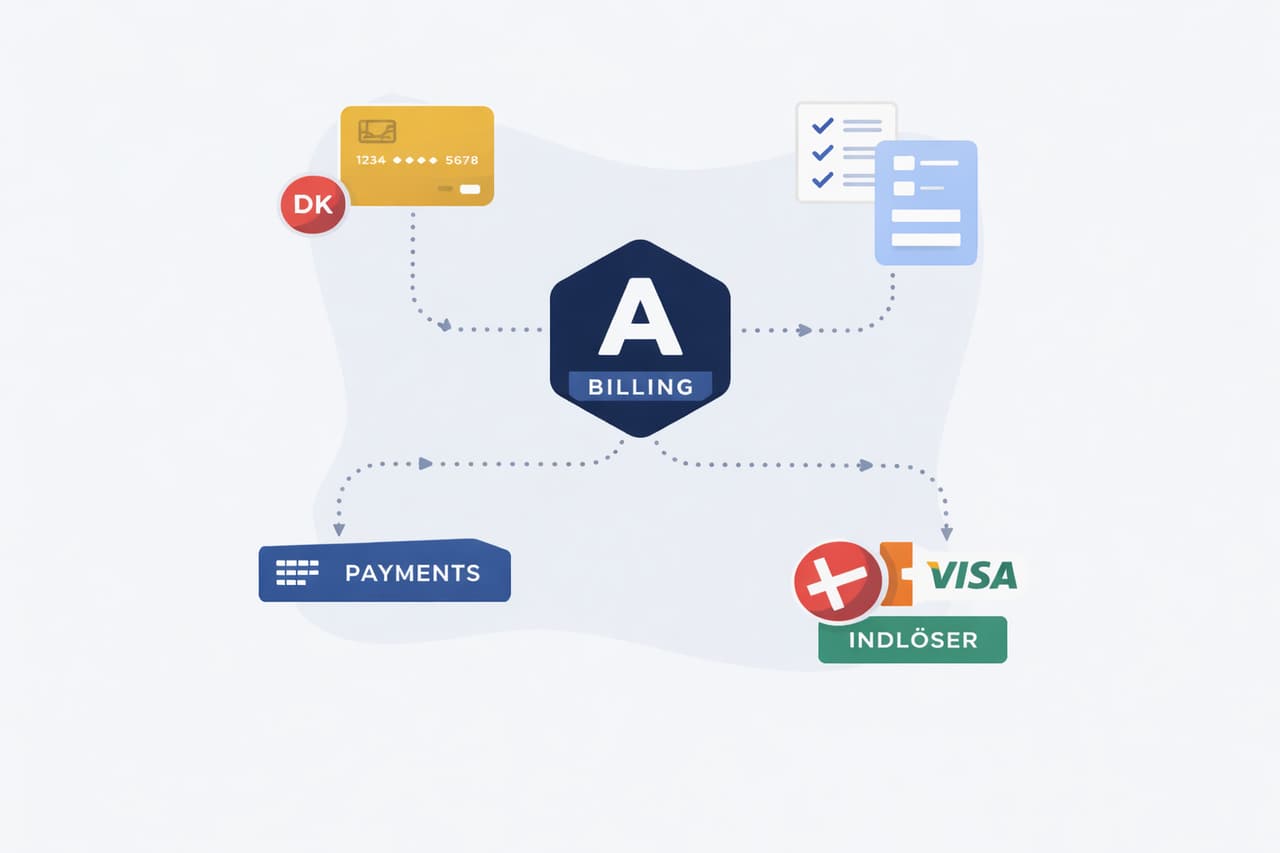
Get a detailed look at the online payment ecosystem. In this post, I will explain what a payment gateway is, which options are available and how Alunta works with one. Then we will look at acquirers, what an acquiring agreement is and how to get started.
If you do not need all the details, I have put together a short, practical checklist to get you started with online payments today.
See it just below.
TL;DR – How to get started with online payments (step by step)
- Create an Alunta account: Start with a free account and choose card payments as your payment method.
- Choose a payment gateway and acquirer: Decide which payment gateway you want to use.
- Get the necessary agreements: Set up an acquiring agreement (for example, through Nets for Dankort or Clearhaus for Visa/Mastercard). Some gateways can help you with this along the way.
- Connect the gateway in Alunta: Connect your chosen payment gateway to Alunta, such as OnPay or Stripe, so Alunta can collect payments automatically.
- Set up subscriptions and test: Create your subscription products in Alunta with a price and interval. Make a test payment to ensure everything works before going live.
How the ecosystem works: Alunta vs. payment gateway vs. acquirer
When you accept online card payments, several parties work together behind the scenes. Here is an ambitious, homemade attempt to illustrate the ecosystem for you:

Looks good, right? :-)
Let’s take a closer look.
Alunta: The subscription engine at the top. Alunta manages your subscriptions and customer payments. When a payment needs to be collected, Alunta notifies the connected gateway and also ensures that an invoice is created and booked automatically in your accounting system. Alunta is not a payment gateway or an acquirer, but works on top of them to save you manual work.
Payment gateway (PSP): The payment window on your website. The gateway securely receives the customer’s card details, for example through an encrypted payment window, and passes them on to the acquirer. Examples include OnPay, QuickPay, Reepay and Stripe. The gateway handles technical requirements such as 3-D Secure and support for MobilePay, Apple Pay and more, but does not hold the money itself.
Acquirer: The financial intermediary, usually a bank or payment institution, that approves the payment and manages the flow of funds. The acquirer charges the amount to the customer’s card through the card network (Visa/Mastercard/Dankort) and pays the money into your business account. Examples include Nets, Clearhaus, Swedbank Pay and others. An acquiring agreement is like having a merchant account with that institution, where your card payments are collected before being settled to you.
In short: The gateway is the online terminal; the acquirer moves the money. Alunta ties it all together by automating the process from the customer’s card payment through to bookkeeping.
Below, we take a closer look at the specific options available in Denmark.
Popular payment gateways in Denmark
OnPay – A Danish-developed payment gateway by team.blue.
- Advantage: A free Start-up package with no monthly subscription.
- Disadvantage: The free package has a relatively high transaction fee (about DKK 1 per payment), which can become expensive if you have many small transactions.
QuickPay – One of the most widely used payment gateways in Denmark, with more than 30,000 webshops as customers.
- Advantage: Local Danish support and easy integration with MobilePay, Visa, Mastercard and more.
- Disadvantage: Can be more expensive than some international alternatives, for example because of fixed subscriptions and fees.
Reepay – A modern Danish payment solution that is especially strong for subscription businesses.
- Advantage: Ideal for managing subscriptions and easy to integrate with platforms such as WooCommerce and Shopify.
- Disadvantage: Primarily focused on Denmark, which limits its international reach.
Stripe – A global payment gateway (including acquiring) with many advanced online payment features.
- Advantage: Supports 135+ currencies and recurring payments, making it ideal for international webshops and subscription businesses.
- Disadvantage: Requires more technical setup, and the documentation can be complex to work with. Bookkeeping in Danish accounting systems is also not quite up to scratch.
Danish acquirers
Nets – Denmark’s leading card acquirer, which also operates Dankort.
- Advantage: The only acquirer that can process Dankort-only payments (Dankort without Visa) alongside international cards under one agreement.
- Disadvantage: Limited price transparency: fees and prices are only provided on direct request, and setup fees may apply.
Clearhaus – A Danish fintech acquirer focused on e-commerce and fast onboarding.
- Advantage: Very fast setup (approval typically takes 1–3 days) and no monthly or setup fees.
- Disadvantage: Does not support Dankort-only transactions (only Visa/Mastercard payments), so Dankort requires a separate Nets agreement.
Swedbank Pay – The largest card acquirer in the Nordic region, with a particularly strong presence in Sweden.
- Advantage: Ensures fast and reliable settlement of card payments to your webshop, with quick payouts.
- Disadvantage: Has introduced additional fees. For example, the full acquiring fee is charged on refunds, which can make refunds expensive.
Dankort vs. Visa/Dankort: why Nets has a monopoly (and when it matters)
Dankort is Denmark’s national debit card, while Visa/Dankort is a combined card that works as Dankort in Denmark and Visa abroad. Nets owns the Dankort system, and only Nets can acquire Dankort-only online payments.
In practice, more than 90% of all online card payments today run through the Visa/Mastercard networks. If your customer has a Visa/Dankort, the payment will typically run over the Visa part unless both you and the customer specifically choose Dankort. For a shop, Dankort’s advantage is slightly lower transaction fees (a low fixed price in kroner) and that some customers prefer it. The downside is that it requires a separate Nets agreement and implementation.
When does this matter? If your audience is broad, for example with many private customers in Denmark, some may have only a Dankort without Visa (typically older card issues or certain business cards). Without a Nets agreement, those customers cannot pay you: the card will be declined because providers such as Stripe do not support the Dankort network. On the other hand, if all your customers have Visa or Mastercard, you can leave Dankort out to begin with.
The main point: Many new webshops can postpone a Dankort agreement and use Visa/Mastercard through Clearhaus or Stripe, for example. But if you run a larger Danish business, such as a grocery store where many people use Dankort, you should get a Nets/Dankort agreement, both for your customers and to benefit from Dankort’s low fees on high transaction volumes. Nets has a monopoly on Dankort, and we have to live with that. Fortunately, most customers’ cards also carry a Visa or Mastercard logo, so you can get a long way without it.
(Pro tip: If you are unsure, start without Dankort. You can always add it later as your order book grows.)
How Alunta works with gateways and acquirers
Alunta is the link between your subscription system and payment solution. With Alunta, you do not have to code or manage subscription payments manually. The platform ensures everything runs automatically as soon as a customer signs up. Here is what Alunta automates together with your gateway and acquirer:
- Automatic card charging: Alunta stores the customer’s “card token” securely through the gateway and automatically initiates a charge at every subscription renewal. You do not have to go in and click “charge”.
- Invoice & receipt: Every payment automatically triggers an invoice for the customer, usually by email. The invoice includes payment details, and Alunta marks it as paid as soon as the transaction goes through.
- Bookkeeping in your accounting system: Alunta integrates with accounting systems such as e-conomic, Dinero, Billy and others. When a payment is completed, the invoice and payment are sent automatically to your accounts. Revenue is booked accurately for each customer, without manually exporting or importing anything.
- Subscription management: If a customer changes their subscription (upgrade, discount, pause, interval change and so on), Alunta handles it. The system adjusts the next payment so the correct amount is charged. It also handles price changes during an active period, so the customer automatically pays the new amount going forward.
- Dunning and retrying charges: If a payment fails (expired card, insufficient funds and so on), Alunta detects it immediately. The system can send the customer a friendly reminder to update their card or add funds, and will typically try to charge again after an interval. This reduces the risk of losing revenue due to failed payments.
- Customer self-service: Alunta includes a customer portal where customers can update their card details, view invoices and change their subscription. The portal connects directly to the gateway, so card updates are handled securely without you touching confidential data.
- Refunds and cancellations: If you need to refund a payment, you can do it through Alunta. The system sends the refund to the gateway/acquirer and ensures it is booked correctly. You can also cancel subscriptions with one click, after which Alunta automatically stops future charges.
In short, Alunta is the “brain” that uses the gateway as its “hands” to carry out the payments. You only need to set things up once; after that, subscriptions run on autopilot. You can trust that payments, invoices and bookkeeping add up without having to cross-check every single month.
Step by step: get started with Alunta and online payments
Getting started does not have to be difficult. Follow this guide and you will be ready to accept subscription payments online:
- Create a free Alunta account: Go to the Alunta website and create an account (it is free and you do not need a credit card to try it). Follow the onboarding guide until you reach the payment section.
- Choose “Payment card” as your payment method: Alunta supports card payments and other methods, but choose card here because this guide focuses on online card payments.
- Connect a payment gateway in Alunta: In Alunta settings, find the “Payment gateway” module. Choose your provider there. For example, click OnPay and enter the required API keys or account details to connect Alunta to the gateway.
- Make sure you have an acquiring agreement: If you chose OnPay, you need an acquiring agreement. You could apply to Clearhaus at the same time (through the gateway setup) or use a Nets agreement. Check that your gateway has registered your acquiring agreement (often a “merchant ID” that you enter in the gateway’s admin panel).
- Set up your subscriptions in Alunta: Create your products or subscription types. Give them a name, price, payment interval (monthly, annual and so on) and payment method. Choose the card payment flow you have just set up. Add a trial period or discounts if relevant.
- Activate Alunta’s self-service portal: Go to the Self-Service module and generate your unique sign-up link. Once it is ready, embed it on your website (for example, in a “Sign up” button) or send it directly to customers by email.
- Test the flow as a customer: Before you launch, sign up for a subscription yourself using the link as if you were a customer. Use a test card if you like (OnPay has a test mode) or make a small payment with your own card. Check that the payment goes through, a “thank you for your payment” page appears, you receive an invoice and everything is visible in the Alunta dashboard. Adjust any settings if something does not work. You can also write to me directly at oliver@alunta.com
- Connect your accounting system: For the full benefit, go to Apps/Integrations in Alunta and activate the integration with your accounting system (if you use e-conomic, Dinero, Billy and so on). Log in and grant access. Alunta will then be able to transfer invoices to your accounts automatically.
- Go live and tell your customers: You are ready! Make the sign-up link visible on your website and tell any existing customers that you now offer automatic card payments. New customers will be able to sign up and pay on their own, without your involvement.
- Keep an eye on things for the first few weeks: Check the Alunta dashboard regularly at first. Confirm that payments are collected on their due dates and that there are no failed transactions. Alunta will let you know if something needs your attention. Once you have seen it running smoothly, sit back and let the system work for you!
(The steps above may sound extensive, but in practice the setup can be done in an afternoon.)
Common mistakes and misunderstandings about online payments
The setup is straightforward, but things can occasionally go wrong. Here are some classic mistakes and misunderstandings to avoid:
- Confusing the gateway with the acquirer: A common mistake is thinking that having a payment gateway account is enough. Remember: without an acquiring agreement, the money cannot reach your account. The gateway provides the payment window, but you still need an acquirer (bank) to move the money. Solution: arrange both, perhaps through a combined solution or with help from the gateway’s support team.
- Forgetting to connect the acquirer to the gateway: Following on from the above, people sometimes get a Nets or Clearhaus agreement but forget to enter their credentials in the gateway system. Result: payments fail because the gateway does not know where to send the transactions. Remember to configure the gateway correctly with the acquirer ID, API keys and so on.
- Not enabling 3-D Secure correctly: Since PSD2, 3-D Secure has been required for most card payments. If your gateway asks you to submit information to enable 3-D Secure, do so; otherwise, customers’ banks may decline the payments. Many gateways now enable it automatically, but double-check your dashboard.
- Forgetting to switch from test mode in production: You test in sandbox mode but forget to switch to live mode when you launch. The customer then cannot pay. Make sure to “Go Live” and set up your live keys before opening for sales.
- Expecting instant payouts: New webshop owners can get nervous when money does not arrive the same day. Remember that the acquirer typically pays out with a delay, from daily to weekly depending on your agreement. It often takes 1–5 banking days for a sale to reach your account. That is normal.
- The customer’s card is declined, panic: A card can be declined for many reasons (insufficient funds, incorrect 3-D Secure code, expired card). Occasional declines are normal. Alunta/the gateway will try again or notify you or the customer. No need to panic: contact the customer and ask them to update their card details if necessary.
- Assuming “Visa” automatically includes Dankort: As explained above, no, not if the card is Dankort-only. Check your customer base: if most have international cards, you are fine. But if you see unexplained declines, they may be Dankort-only cards. That is a sign to look into Nets.
- Missing bookkeeping: Some people forget to connect an accounting system or think “the accountant can do that later”. This leads to manual hassle. Use Alunta’s integration to automate it from the start, so you do not end up with a till receipt for 200 identical payments that must later be split across customers.
And remember: do ask for help. Your gateway, your acquirer and I would all rather answer “silly questions” in time than have you run into unfortunate problems later.
Ready to accept online payments? Try Alunta for free
Online payments do not have to be a jungle. With the right partners, a good gateway, a reliable acquirer and Alunta to tie everything together, you can save time and avoid errors while money comes in every month.
Follow the lead of many Danish businesses: make the move to automatic card payments and see how subscription payments practically run themselves. Alunta will help you get started.